As you might have noticed from my previous blog posts, I was invited to test out a very expensive Hasselblad camera a few weeks back. The location was the Hasselblad studios in London and whilst I visiting I couldn't resist recorded a couple of lighting videos.
In this first video I revisited the pure white background tutorial I made several years back. Since that original video I've refined the technique which now contains more accurate and useful information for anyone looking for the perfect white background.
Showing posts with label video. Show all posts
Showing posts with label video. Show all posts
Wednesday, 2 March 2011

Sunday, 3 October 2010
Moody Mono in Lightroom 3 - Video
Lightroom 3 is a big part of my workflow because of it’s amazing ability to process a whole days shoot in just a few hours. Picking the keepers from the rejects is surprisingly simple and because Lightroom uses the same engine as Adobe Camera RAW there’s a huge amount of control at my fingertips.
I’m currently working on some Lightroom tutorials so I thought I’d test the water a little. So in this video I’ll show you how you can use Lightroom to process a moody black and white image.
Even if you don’t use Lightroom you can still follow along as you’ll find exactly the same tools in Adobe Camera RAW (ACR) found in Photoshop CS3, CS4 and CS5.
I’m currently working on some Lightroom tutorials so I thought I’d test the water a little. So in this video I’ll show you how you can use Lightroom to process a moody black and white image.
Even if you don’t use Lightroom you can still follow along as you’ll find exactly the same tools in Adobe Camera RAW (ACR) found in Photoshop CS3, CS4 and CS5.
Wednesday, 23 June 2010
Grey background lighting tips and tricks - Quick Shots 08
This Quick Shot question is from Nick Stewart who wanted to know what all the fuss is about grey backgrounds and some tips on lighting them.
First off I should say my studio is fitted with a seamless vinyl background which I absolutely love working with. With careful lighting I can make it pure white through to dark grey. I also have a roll of black muslin which I roll out if I need a black or light it with gels for some funky colour effects.
Much as I love my white seamless, if I only had the room/money for one background it would be grey. Why? Well watch the video to find out.
A couple of questions from the video.
What triggers were you using?
They’re the Yongno RF602
I love the gel idea who makes them?
I’m using the Strobist gels from Rosco Here's the link
Great, how do I attach them to the speedlite?
I use two little bits of blu-Tack at the edge of the flash. The gels stick every time.
Where have I seen that softbox before?
It's a Lastolite Ezybox and you might have seen it here
Where did you get the grey background?
You can pick them up from many places but mine came from my good friends at smick.co.uk. Here’s the link
Why didn’t you iron the background?
Good point. The reason was to show that creases can vanish when lighting the grey background to white.
So are you saying DON’T iron a muslin background.
No, always iron it before using it.
First off I should say my studio is fitted with a seamless vinyl background which I absolutely love working with. With careful lighting I can make it pure white through to dark grey. I also have a roll of black muslin which I roll out if I need a black or light it with gels for some funky colour effects.
Much as I love my white seamless, if I only had the room/money for one background it would be grey. Why? Well watch the video to find out.
A couple of questions from the video.
What triggers were you using?
They’re the Yongno RF602
I love the gel idea who makes them?
I’m using the Strobist gels from Rosco Here's the link
Great, how do I attach them to the speedlite?
I use two little bits of blu-Tack at the edge of the flash. The gels stick every time.
Where have I seen that softbox before?
It's a Lastolite Ezybox and you might have seen it here
Where did you get the grey background?
You can pick them up from many places but mine came from my good friends at smick.co.uk. Here’s the link
Why didn’t you iron the background?
Good point. The reason was to show that creases can vanish when lighting the grey background to white.
So are you saying DON’T iron a muslin background.
No, always iron it before using it.
Friday, 4 June 2010
Selective colour in Photoshop - Quick Shot 07
Name:: Jessay, Winnipeg, Canada
Question:: Hi Gavin, Can you explain how to make a color splash in the photoshop.In a Big frame only one person in color and the rest in B&W.
Colour popping, selective colour, colour splashing... Many names but one technique which never seems to go out of fashion.
I expecting a few comments along the lines of "That's so easy... or, show us something more complex..." and so on, but before you post a comment just remember there was a time when even YOU didn't know this technique.
By the way, this video is also available in HD which is great if you watch the video in full screen mode. Have a look and tell me what you think.
Tuesday, 25 May 2010
Exposure compensation - video & tips
This Quick Shot question comes from Gary S who asks:
“…I don't really understand what the Exposure Compensation is and when it should be used. I remember seeing you use it by 1 stop I think it was to prevent a white back drop looking grey”
Scroll down for some exposure compensation FAQ's
Where’s Exposure Compensation on my camera?
I might be called EV +/- check your manual.
Can I use Exposure Compensation in Manual mode?
No, exposure composition may is usually only available in Aperture Priority, Shutter Priority and Program modes.
Isn’t the camera meter always correct?
Modern cameras feature intelligent meters which produce good images every single time… almost. Good as they are they still make mistakes, which is why checking your cameras LCD and histogram from time to time is a good idea.
My Canon DSLR’s exposure compensation doesn’t seem to work.
Make sure you have the on button switched to the angled line symbol.
But I was told real photographers only ever use Manual mode, everything else was for amateurs.
Total rubbish. Most photographers I know generally use Aperture Priority when shooting in natural light.
Can Exposure Compensation be used in other ways?
Yes it can. By deliberately inducing under or over exposure you can add mood to an image. Dark images add drama where light images feel calming.
I thought Camera RAW could pull back two stops, so why do it in the camera.
In fact Adobe Camera RAW can pull 4 stops each way and that can be a life saver at times. But be careful not to fall into the mind set of thinking “I’ll fix it in Photoshop”, it’s a very slippery slope. Try and think I’ll get it right in camera and you’ll be a better, happier photographer.
“…I don't really understand what the Exposure Compensation is and when it should be used. I remember seeing you use it by 1 stop I think it was to prevent a white back drop looking grey”
Scroll down for some exposure compensation FAQ's
A few questions that have already arisen:
Where’s Exposure Compensation on my camera?
I might be called EV +/- check your manual.
Can I use Exposure Compensation in Manual mode?
No, exposure composition may is usually only available in Aperture Priority, Shutter Priority and Program modes.
Isn’t the camera meter always correct?
Modern cameras feature intelligent meters which produce good images every single time… almost. Good as they are they still make mistakes, which is why checking your cameras LCD and histogram from time to time is a good idea.
My Canon DSLR’s exposure compensation doesn’t seem to work.
Make sure you have the on button switched to the angled line symbol.
But I was told real photographers only ever use Manual mode, everything else was for amateurs.
Total rubbish. Most photographers I know generally use Aperture Priority when shooting in natural light.
Can Exposure Compensation be used in other ways?
Yes it can. By deliberately inducing under or over exposure you can add mood to an image. Dark images add drama where light images feel calming.
I thought Camera RAW could pull back two stops, so why do it in the camera.
In fact Adobe Camera RAW can pull 4 stops each way and that can be a life saver at times. But be careful not to fall into the mind set of thinking “I’ll fix it in Photoshop”, it’s a very slippery slope. Try and think I’ll get it right in camera and you’ll be a better, happier photographer.
Friday, 7 May 2010
Beach - 15 Minute Photo Challenge
Firstly, a huge thank you to everyone who’s helped kick the new Gavtrain Facebook page off to a flying start. I know a lot of you have already become fans which is fantastic.
OK, on to today’s blog post. I get a regular stream of emails asking for me to do more 15 minute challenges so after a winters break I’m very pleased to be able to post the first 15 minute challenge of the year.
If you want to have a better look at see some of the check out my Flickr photostream or follow the links below to see the individual photos.
http://www.flickr.com/photos/photogavin/4574957716/sizes/o/
http://www.flickr.com/photos/photogavin/4574326343/sizes/o/
http://www.flickr.com/photos/photogavin/4574959432/sizes/o/
http://www.flickr.com/photos/photogavin/4574324635/sizes/o/
http://www.flickr.com/photos/photogavin/4574325197/sizes/o/
http://www.flickr.com/photos/photogavin/4574325523/sizes/o/
OK, on to today’s blog post. I get a regular stream of emails asking for me to do more 15 minute challenges so after a winters break I’m very pleased to be able to post the first 15 minute challenge of the year.
If you want to have a better look at see some of the check out my Flickr photostream or follow the links below to see the individual photos.
http://www.flickr.com/photos/photogavin/4574957716/sizes/o/
http://www.flickr.com/photos/photogavin/4574326343/sizes/o/
http://www.flickr.com/photos/photogavin/4574959432/sizes/o/
http://www.flickr.com/photos/photogavin/4574324635/sizes/o/
http://www.flickr.com/photos/photogavin/4574325197/sizes/o/
http://www.flickr.com/photos/photogavin/4574325523/sizes/o/
Thursday, 29 April 2010
120cm Octagonal Softbox – Video
I’ve always wanted to give a octagonal softbox a go. I’ve heard wonderful things about the light quality that such a large light surface produces. A few weeks back I finally got the chance to use one during a video shoot for smick.co.uk.
The more observant will notice this is the shoot is connected to yesterdays post. So if you want to know what was done to the images in Photoshop click here.
So what’s the verdict? Well lets start with the plus points.
First the light really is amazingly soft and I was only using the smaller 120cm version. A 400w flash head was easily able to fill the softbox with light and a quick check with a light meter showed the light drop off was pretty good at ½ to ¾ stop centre to edge. That gives predictable, controllable illumination making my job a lot easier.
As you’ll see in the video the large size of the softbox also enabled me to use it as an illuminated background making a it perfect for head shots where a white background is required. Just remember set the background light 0-3/4 stop brighter then the key light.
Another nice thing about the octagonal softbox is the eye catch light it produces is rounder then the rectangular softboxes I usually use. Having said that it’s not something my clients have mentioned so it may be one of those “photographer” things.
Now for the drawbacks and there are a couple.
First is its size. The very thing that makes it a great light is a big problem when space is limited. My studio is pretty small and the octagonal softbox made it feel even smaller. You also need to watch the balance. I found by using a sturdy lighting stand fitted with a DIY sand bag weight at the base kept things stable and avoided any expensive accidents.
If you to see the video in full or find out more about the Octaganal Softbox follow this link http://www.smick.co.uk/index.php/portrait-lighting-tutorial-using-120cm-softbox/
The more observant will notice this is the shoot is connected to yesterdays post. So if you want to know what was done to the images in Photoshop click here.
So what’s the verdict? Well lets start with the plus points.
First the light really is amazingly soft and I was only using the smaller 120cm version. A 400w flash head was easily able to fill the softbox with light and a quick check with a light meter showed the light drop off was pretty good at ½ to ¾ stop centre to edge. That gives predictable, controllable illumination making my job a lot easier.
As you’ll see in the video the large size of the softbox also enabled me to use it as an illuminated background making a it perfect for head shots where a white background is required. Just remember set the background light 0-3/4 stop brighter then the key light.
Another nice thing about the octagonal softbox is the eye catch light it produces is rounder then the rectangular softboxes I usually use. Having said that it’s not something my clients have mentioned so it may be one of those “photographer” things.
Now for the drawbacks and there are a couple.
First is its size. The very thing that makes it a great light is a big problem when space is limited. My studio is pretty small and the octagonal softbox made it feel even smaller. You also need to watch the balance. I found by using a sturdy lighting stand fitted with a DIY sand bag weight at the base kept things stable and avoided any expensive accidents.
If you to see the video in full or find out more about the Octaganal Softbox follow this link http://www.smick.co.uk/index.php/portrait-lighting-tutorial-using-120cm-softbox/
Wednesday, 28 April 2010
The unseen tutorial
Yesterday was the Photovison Roadshow at Hatfield House and it was a fantastic day with lots to see and do. I spent a large part of the day talking to lots and lots of fellow photographers, answering Photoshop questions and giving mini training sessions.
First of all I’d like to thank the Photovison team for the opportunity to be there, but more importantly a huge thank you to the many people who came up and said hello. I’m always totally humbled by photographers who shake my hand and tell me how much they’ve learned by watching some of my YouTube training videos, buying my DVD’s or reading this blog. I even discovered that one or two people, who I looked up to, are also following this blog. What an honour.
To give you a flavour of what I was doing, here’s a video tutorial exclusively for my blog readers.
If you missed the Hatfield Roadshow, never fear. Photovision moves on to Manchester in two weeks time. I highly recommend a visit, not only to talk to many photographic companies that will be exhibiting, but also for the excellent free seminars from Mark Cleghorn, Guy Gowan and Uzair Kharawala to name but three.
First of all I’d like to thank the Photovison team for the opportunity to be there, but more importantly a huge thank you to the many people who came up and said hello. I’m always totally humbled by photographers who shake my hand and tell me how much they’ve learned by watching some of my YouTube training videos, buying my DVD’s or reading this blog. I even discovered that one or two people, who I looked up to, are also following this blog. What an honour.
To give you a flavour of what I was doing, here’s a video tutorial exclusively for my blog readers.
If you missed the Hatfield Roadshow, never fear. Photovision moves on to Manchester in two weeks time. I highly recommend a visit, not only to talk to many photographic companies that will be exhibiting, but also for the excellent free seminars from Mark Cleghorn, Guy Gowan and Uzair Kharawala to name but three.
Friday, 16 April 2010
Long exposure technique - Quick Shots 05
UPDATE: The photos from this post are now on Flickr
http://www.flickr.com/photos/photogavin/4530406343/
http://www.flickr.com/photos/photogavin/4531039982/
http://www.flickr.com/photos/photogavin/4531040134/
It’s been a bit of a blog free week for me as I’ve been away with the family for a mid week break by the sea.
We managed to find one of the few places in the UK without a 3G internet connection, so I feel like I’ve been a little cut off from all the excitement that’s been going on around the launch of Photoshop CS5.
Just be for I left a Quick Shot question landed in my inbox from Daniel Roberts who asked a great question. Basically Daniel wanted to some tips and advice on how to get silky smooth water on long exposures.
Fortunately I was planning to take exactly that kind of shot whilst I was away, so I threw my video camera into my camera bag and set off for the coast.
http://www.flickr.com/photos/photogavin/4530406343/
http://www.flickr.com/photos/photogavin/4531039982/
http://www.flickr.com/photos/photogavin/4531040134/
It’s been a bit of a blog free week for me as I’ve been away with the family for a mid week break by the sea.
We managed to find one of the few places in the UK without a 3G internet connection, so I feel like I’ve been a little cut off from all the excitement that’s been going on around the launch of Photoshop CS5.
Just be for I left a Quick Shot question landed in my inbox from Daniel Roberts who asked a great question. Basically Daniel wanted to some tips and advice on how to get silky smooth water on long exposures.
Fortunately I was planning to take exactly that kind of shot whilst I was away, so I threw my video camera into my camera bag and set off for the coast.
Friday, 9 April 2010
Video - Focus stacking in Photoshop CS4
Yesterday I was giving a talk to the Lee Valley Nature Photographers and demonstrating the finer points of Adobe Camera RAW. But I always like to throw a few curve balls at my audience in my lectures and as I was talking to a group of nature photographer I got the chance to demonstrate a feature of Photoshop CS4 that’s amazingly useful for macro photographers.
It’s called focus stacking and automates the process of combining multiple images and gaining maximum depth of field. If you've not seen focus stacking it in action, then you have to watch this video.
It’s called focus stacking and automates the process of combining multiple images and gaining maximum depth of field. If you've not seen focus stacking it in action, then you have to watch this video.
Thursday, 25 March 2010
Creative Flower Photos - Quick Shots 04
This weeks question was sent in by Alex R who asked:
Question:: Hi Gavin, I'm really into flower photography, and was just wondering what is some cool ways to improve and edit them inside of photoshop. E.g blending, borders, colours...etc


Question:: Hi Gavin, I'm really into flower photography, and was just wondering what is some cool ways to improve and edit them inside of photoshop. E.g blending, borders, colours...etc
The final image can be view on my Flickr photostream
If you fancy having a go yourself then you're welcome to use the same images I showed in the video.


Usual rules apply: Images are copyright Gavin Hoey and are for personal use only. They may not be sold, passed on or used for any advertising without my permission.
Thursday, 18 March 2010
Shadows & Borders in Photoshop - Quick Shots 03
This weeks Quick Shot question is...
How to add a border and a drop shadow onto an image.
If you have a question you’d like to see answered in a Quick Shot video then head over to the Gavtrain home page and send it over.
I can’t believe how many of you have taken the time to send me your Quick Shot questions. There’s some really great answers coming up. I received a surprising number photography related questions, which is great. If the fine weather holds, I plan to get some photography tutorials filmed next week.
How to add a border and a drop shadow onto an image.
If you have a question you’d like to see answered in a Quick Shot video then head over to the Gavtrain home page and send it over.
I can’t believe how many of you have taken the time to send me your Quick Shot questions. There’s some really great answers coming up. I received a surprising number photography related questions, which is great. If the fine weather holds, I plan to get some photography tutorials filmed next week.
Sunday, 14 March 2010
Portrait Professional 9 - My new best friend
The debate about “photoshoped” or “airbrushed” images of models being used in magazines and advertising is one that’s been rolling on for sometime. But whatever your opinions on the subject the reality is almost everyone wants to look 10 years younger in there studio portraits.
For me that usually means hours on Photoshop reducing wrinkles, smoothing skin and deleting spots. I’ve always viewed it as just another part of the job, but all that has changed thanks to a clever piece of software called Portrait Professional 9 from Anthropics Technology. For the record, I’m in no way connected, employed or getting any kind of kick backs to promote their product, I just love it.
For me that usually means hours on Photoshop reducing wrinkles, smoothing skin and deleting spots. I’ve always viewed it as just another part of the job, but all that has changed thanks to a clever piece of software called Portrait Professional 9 from Anthropics Technology. For the record, I’m in no way connected, employed or getting any kind of kick backs to promote their product, I just love it.

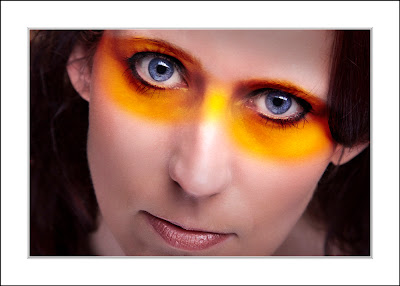
This picture is the final product of about 40 minutes at the computer. Without Portrait Professional that would have been more like 90 minutes. Although the makeup effect was added in Photoshop, the underlying skin tones were smoothed in Portrait Professional.
I could go into great detail about the benefits of the software, but to really understand what a game changer Portrait Professional is I made this short video review.
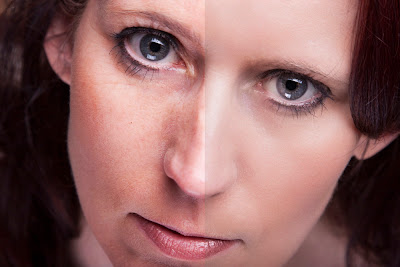
For a clearer look at the difference, click the image above for a before / after view.
And so the question you really want to know is… What the price of this software ? Unusually for a software company, Anthropics Technology is asking a very fair price of £50.00. Better still for a limited time you can get 10% discount if you use the promo code dp4010 when you buy Portrait Professional online. They also offer a free trial of the software so you can make up your own mind.

For a clearer look at the difference, click the image above for a before / after view.
And so the question you really want to know is… What the price of this software ? Unusually for a software company, Anthropics Technology is asking a very fair price of £50.00. Better still for a limited time you can get 10% discount if you use the promo code dp4010 when you buy Portrait Professional online. They also offer a free trial of the software so you can make up your own mind.
Friday, 12 March 2010
Share & Back Up your Photoshop Custom Brushes - Quick Shots 02
This week the question is...
"How can I share my custom brushes with my friends?"
The answer is pretty simple so as well as answering the question I'm going to show you how you make a custom brush and them save a modified version of that brush.
"How can I share my custom brushes with my friends?"
The answer is pretty simple so as well as answering the question I'm going to show you how you make a custom brush and them save a modified version of that brush.
Friday, 5 March 2010
Jpeg in to RAW - Quick Shots 01
First a huge thank you to everyone who took the time and trouble to post a comment or send me an email with suggestions for the name of the new videos and your questions.
As you will see I choose the title “quick shots” from the many excellent suggestions.
This week the question is… Can I open Jpegs in Adobe Camera RAW?
Check back again next Friday for another Quick Shot question answered.
As you will see I choose the title “quick shots” from the many excellent suggestions.
This week the question is… Can I open Jpegs in Adobe Camera RAW?
Check back again next Friday for another Quick Shot question answered.