It’s time for another round of answers to your Quick Shot Questions. This time the questions include..
My favourite lens for portraits
How to make dreamy water shots
Advice on Macro lens choice
Tips on Auto exposure bracketing
Monday, 14 March 2011

Wednesday, 2 March 2011
Perfect pure white background - Studio lighting tutorial
As you might have noticed from my previous blog posts, I was invited to test out a very expensive Hasselblad camera a few weeks back. The location was the Hasselblad studios in London and whilst I visiting I couldn't resist recorded a couple of lighting videos.
In this first video I revisited the pure white background tutorial I made several years back. Since that original video I've refined the technique which now contains more accurate and useful information for anyone looking for the perfect white background.
In this first video I revisited the pure white background tutorial I made several years back. Since that original video I've refined the technique which now contains more accurate and useful information for anyone looking for the perfect white background.
Wednesday, 23 February 2011
RAW Double Process - HDR effect.
Ever since I posted the last 15 minute photo challenge video I've been constantly receiving questions like... How did you make the images look so good, what did you do in Photoshop, are they all HDR... and so on.
Now, normally I don't show the Photoshop techniques I use to create the photos from the 15 minute challenge photo challenge. Please understand, that's not for any reasons of secrecy, I just think you would be very disappointed at how little I actually do to the images. On the few occasions I show people they often end up saying... "and that's it!"
However such was the lighting at the Gatwick Aviation Museum, where I filmed the photo challenge, that Photoshop played a much bigger role in the image creation. So here's a short video demonstrating one of the techniques I employed.
Now, normally I don't show the Photoshop techniques I use to create the photos from the 15 minute challenge photo challenge. Please understand, that's not for any reasons of secrecy, I just think you would be very disappointed at how little I actually do to the images. On the few occasions I show people they often end up saying... "and that's it!"
However such was the lighting at the Gatwick Aviation Museum, where I filmed the photo challenge, that Photoshop played a much bigger role in the image creation. So here's a short video demonstrating one of the techniques I employed.
Friday, 18 February 2011
Quick Shot Answers No.1
You asked the questions and I’ll provide the answers.
 Questions in this video.
1- How do I minimise noise ?
2- How many studio lights do I really need?
3- Does Elements have the same RAW controls and Photoshop?
4- Why can’t open Nikon D3100 RAW files in Photoshop CS5?
 Questions in this video.
1- How do I minimise noise ?
2- How many studio lights do I really need?
3- Does Elements have the same RAW controls and Photoshop?
4- Why can’t open Nikon D3100 RAW files in Photoshop CS5?
Wednesday, 16 February 2011
Hasselblad H4D - Experience and thoughts
Let’s get something clear right from the word go… I love my Canon cameras and lenses and have no plans to buy a Hasselblad any time soon. OK with that out of the way I’ll briefly explain why I’m not using Canon for the photos in this post.
A few weeks back I received an email from Hasselblad offering me the chance to get hands on experience with their H4D medium format digital camera. A few emails and a brief meeting later, I’d arranged to shoot a couple of studio lighting videos at Hasselblads shiny new studios in London. They’re coming soon, but for now here’s my thoughts on the camera.
Dream camera?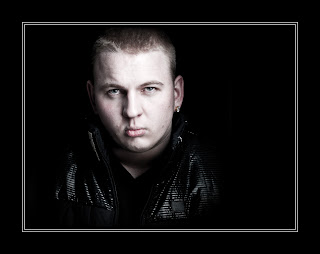
Hasselblad is a name I’ve been familiar with since my earliest days in photography. It’s a brand that many photographers aspire to and comes with a price tag to match. But for some professional photographers the initial cost isn’t an issue when quality is all that counts and I tell you right now the H4D produces images with amazing sharpness and detail, far in excess of my usual Canon 5d Mark II.
For my day in the studio I’d lined up Delaney, an up and coming rapper, to be my model. Hasselblad had promised to loan me a H4D-31 for the shoot. It has the smallest sensor in the H4D range, but at 30 million pixels small is a relative term. However when I arrived the H4D-31 was unavailable, so instead used the midrange H4D-50 which packs a massive 50 million pixel sensor. Other then a bigger sensor the two cameras are identical.
If it's heavy it must be good
First impressions of the H4D is that it’s a big, heavy camera, but surprisingly comfortable to hold. When I swapped the standard 80mm lens for a 35-90mm zoom, the H4D became very heavy indeed, which may explain why so many Hasselblad owners prefer to use a tripod.
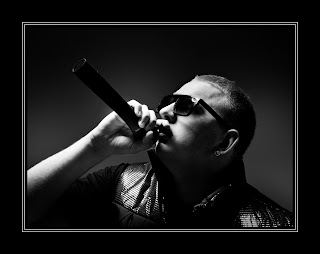 In use the H4D was as easy to operate as any DSLR camera. All the usual shooting modes are there (Aperture, Shutter Priority and Manual). Half pressing the shutter button will lock focus and exposure just like my DSLR. Perhaps my favourite feature was the “True Focus” function, which allowed me to retain focus on a subject even after I’ve recomposed the shot. Believe me it was clever stuff.
Pressing the shutter button is a satisfying experience. A half press will focus, which isn’t fast, but it works just fine. Fully press the shutter button to take the shot and you’ll hear a very satisfying clunk. The image pops up on the cameras LCD almost immediately for review.
The drawbacks
So it’s good news all the way then? Well no. The 50 million pixel sensor produces a 75mb RAW file, so you’ll need lots of memory cards, lots of hard drive space and a fairly beefy computer to process them all. You’ll also need a spare battery for the camera as they drain surprisingly fast.
Such is the clarity and resolution of the camera that every little detail is visible. So for example on portraits, every minor pimple, dry skin patch or makeup mishap will need retouching. Don’t believe me? Take at look at this actual pixel view… Click to enlarge. The yellow square shows you the area I've enlarged. No sharpening has been added, this is straight from the RAW file.
A few weeks back I received an email from Hasselblad offering me the chance to get hands on experience with their H4D medium format digital camera. A few emails and a brief meeting later, I’d arranged to shoot a couple of studio lighting videos at Hasselblads shiny new studios in London. They’re coming soon, but for now here’s my thoughts on the camera.
Dream camera?

Hasselblad is a name I’ve been familiar with since my earliest days in photography. It’s a brand that many photographers aspire to and comes with a price tag to match. But for some professional photographers the initial cost isn’t an issue when quality is all that counts and I tell you right now the H4D produces images with amazing sharpness and detail, far in excess of my usual Canon 5d Mark II.
For my day in the studio I’d lined up Delaney, an up and coming rapper, to be my model. Hasselblad had promised to loan me a H4D-31 for the shoot. It has the smallest sensor in the H4D range, but at 30 million pixels small is a relative term. However when I arrived the H4D-31 was unavailable, so instead used the midrange H4D-50 which packs a massive 50 million pixel sensor. Other then a bigger sensor the two cameras are identical.
If it's heavy it must be good
First impressions of the H4D is that it’s a big, heavy camera, but surprisingly comfortable to hold. When I swapped the standard 80mm lens for a 35-90mm zoom, the H4D became very heavy indeed, which may explain why so many Hasselblad owners prefer to use a tripod.
 In use the H4D was as easy to operate as any DSLR camera. All the usual shooting modes are there (Aperture, Shutter Priority and Manual). Half pressing the shutter button will lock focus and exposure just like my DSLR. Perhaps my favourite feature was the “True Focus” function, which allowed me to retain focus on a subject even after I’ve recomposed the shot. Believe me it was clever stuff.
Pressing the shutter button is a satisfying experience. A half press will focus, which isn’t fast, but it works just fine. Fully press the shutter button to take the shot and you’ll hear a very satisfying clunk. The image pops up on the cameras LCD almost immediately for review.
The drawbacks
So it’s good news all the way then? Well no. The 50 million pixel sensor produces a 75mb RAW file, so you’ll need lots of memory cards, lots of hard drive space and a fairly beefy computer to process them all. You’ll also need a spare battery for the camera as they drain surprisingly fast.
Such is the clarity and resolution of the camera that every little detail is visible. So for example on portraits, every minor pimple, dry skin patch or makeup mishap will need retouching. Don’t believe me? Take at look at this actual pixel view… Click to enlarge. The yellow square shows you the area I've enlarged. No sharpening has been added, this is straight from the RAW file.

So would I buy one… No. Good as the camera and lenses are, it’s really not going to suit by style of photography. However I’d definitly use one should the need arise, but I'd opt for the hire service that Hasselblad offer on their gear.
Would I recommend one? Well that depends on what sort of photography you do. If you shoot sports, wildlife, need high ISO or prefer to travel light then no, stick to a DSLR. If you shoot landscapes, portraites or still life work, and demand nothing but the best quality images, then this camera should be on you're radar.
And Finally... 
I recorded a couple of videos whilst at the studios. This shot of Sam is a test shot I snapped whilst I figured out one of the lighting set ups. We all loved the background which is made of large pieces of foam. It's the stuff that's usually used to sound proof music studios. I'm pretty sure most of it would have mysteriously disappeared had it not been firmly glued to the wall. Great idea that.
Wednesday, 2 February 2011
Selective colour in five steps
 Selective colour is one of those little Photoshop tricks that’s well worth keeping up your sleeve. The effect is hardly new, cutting edge or revolutionary, but it can still make an eye catching image providing it’s used sparingly.
The basic idea is simple enough. First find a standard colour image that contains a bold area of a single colour. That done you’ll need to select the colour and turn everything else black and white. OK, that sounds easy enough doesn’t it, but how do you select just one colour from an image?
Take a look at the image opposite to get an idea of the direction I’m headed. So let’s begin.
 Step One
First open your image, apply any processing you wish and if your image has multiple layers save a copy and then click Layer - Flatten Image to collapse all the layers down into a single background layer.
 Step Two
Click Select - Color Range to open the color range selection tools. If you’ve never used this tool before don’t worry it’s all nice and straight forward. Moving your cursor over the image will turn it into a colour sampler tool. Click on the colour you’d like to select, in this case red lettering, and have a look at the result on the Color Range window. White shows the selected areas and black shows unselected areas of the image.
 Step three
Either increase the fuzziness to enlarge the range of similar colours sampled or click on the Add to Sample eyedropper and click on more areas of similar colour. Continue until the area of colour you want to select has turned white in the preview window and the majority of the remaining image is black. Remember CTRL+Z will undo your last click… handy to know if you accidentally sample in the wrong spot.
 Step Four
Now this is the bit that seems wrong, but trust me it’s important. Click Select - Inverse.
The chances are there will be areas selected that are the same colour as the thing you wanted to selected, but are not part of it. Remove these using any selection tool you like (free hand lasso is a good choice). Remember to hold Shift as you draw your selection.
 Step five
Click Layer - New Adjustment layer - Black & White and the colour will disappear from the image except the area you selected. The back and white areas can be adjusted by moving the sliders on the Black & White adjustment layer to create a mono look that compliments the image.
So there you have it, selective colour in five easy steps.
Tuesday, 11 January 2011
Out of bounds effect made simple - Photoshop
 It’s high time I made another Photoshop video tutorial. After a few minutes scratching my head thinking what I should do, I took a quick look back through your Quick Shot Questions. One Photoshop question kept coming up which was this… “How did you make that pop up image at the end of the abstract background tutorial?”
The technique is known as out of bounds and as the name suggests the idea is to make part of the image poke out from the frame.
Despite appearances the technique is fairly straight forward when it’s broken down into a few simple steps as you’ll see in this video.
Sunday, 2 January 2011
5 photo motivations tips
If one of your new years resolutions was to take more and better photos, you’re not alone. I say exactly the same thing every year and happily I can report that it’s one resolution I stick to. So what’s my secret?
As with any new years resolution the key in hitting your goal is planning and enjoyment, so here are five of my top tips for making 2011 your best ever photo year.
Make some folders
The more photos you take the more you’ll learn about your camera equipment and as your confidence grows your pictures will improve. That’s all well and good, but how do you keep the motivation going?
My trick is to make twelve new folders and name them Jan-2011, Feb-2011, Mar-2011... And so on.
Now stick them somewhere you’ll see them regularly to remind you that they need filling up!
Camera at the ready
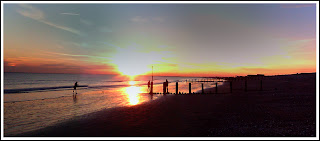 When the moment strikes, how quickly could you be ready to take photos? Is you camera to hand and if so is it loaded with a blank memory card and charged battery?
Of course carrying a heavy SLR and a bunch of lenses around just in case a great photo opportunity comes your way isn’t really an option for most people, that’s why I have a small compact camera I leave in the car. I’ll even reach for my phone to take a snap if needs be, just as I did for the photo above.
Take a course
There’s not a photographer on this planet who doesn’t want to improve their skills, so it makes sense to take a training course every now and then.
But there’s more to training then just training. Group training can be a social occasion, a chance for you to meet up with other photographers, swap tips, try gear and make friends with people who share your passion for photography.
Out of your comfort zone
What do you shoot primarily? Is it landscapes, portraits, wildlife or sports? Whatever your speciality it’s very easy to get stuck in a rut and when that happens (and eventually it will) the fastest way to break out is by doing something different.
As with any new years resolution the key in hitting your goal is planning and enjoyment, so here are five of my top tips for making 2011 your best ever photo year.
Make some folders
The more photos you take the more you’ll learn about your camera equipment and as your confidence grows your pictures will improve. That’s all well and good, but how do you keep the motivation going?
My trick is to make twelve new folders and name them Jan-2011, Feb-2011, Mar-2011... And so on.
Now stick them somewhere you’ll see them regularly to remind you that they need filling up!
Camera at the ready
 When the moment strikes, how quickly could you be ready to take photos? Is you camera to hand and if so is it loaded with a blank memory card and charged battery?
 Of course carrying a heavy SLR and a bunch of lenses around just in case a great photo opportunity comes your way isn’t really an option for most people, that’s why I have a small compact camera I leave in the car. I’ll even reach for my phone to take a snap if needs be, just as I did for the photo above.
Take a course
There’s not a photographer on this planet who doesn’t want to improve their skills, so it makes sense to take a training course every now and then.
But there’s more to training then just training. Group training can be a social occasion, a chance for you to meet up with other photographers, swap tips, try gear and make friends with people who share your passion for photography.
Out of your comfort zone
What do you shoot primarily? Is it landscapes, portraits, wildlife or sports? Whatever your speciality it’s very easy to get stuck in a rut and when that happens (and eventually it will) the fastest way to break out is by doing something different.
 A great example was when I got the chance to shoot a motocross event last year. I'm not a sports photographer, nor do I plan to be one but I had a great day and learned a lot in the process.
So if you’ve never shot a portrait before, make 2011 the year you give it a whirl. Conversely if you spent the whole of 2010 locked in the studio, then get outside and do a wildlife shoot.
If you’re a social media type why not ask around to find someone who doesn’t do your type of photography and would be willing to take you out to share their knowledge for a few hours. In return you could invite them into your world and share your skills with them.
Borrow, hire, buy.
I love getting my hands on new lenses, but it’s an expensive business especially for exotic things like fish eye’s or super telephotos. A great alternative to buying is hiring. Not only does it give you the chance to experiment with something new and different, but you can really test the lens and decide if it’s a lenses you really need or not.
Having something on loan for a short period should also encourage you to use your camera and in reality it’s taking more photos that will improve your photography.
So there you have it, that’s just a few ideas to get you going. If you have any more suggestions feel free to add them to the comments below.
Thursday, 30 December 2010
Best of 2010
 With 2010 drawing to a close I though it might be a good time to look back at some of the videos I’ve made this year. I’m not 100% sure exactly how many Photoshop tutorials and photography tips videos I made this year but for the purposes of this post I’ll stick to the publicly available content on my YouTube Channel.
So from the 28 videos I uploaded to YouTube here are the top videos in various categories…
Longest video - The 10 minute Emergency Christmas Card Photoshop Technique.
Made for my friends at TipSquirrel.com I originally planned to call this the 5 minute Christmas card technique, but I quickly realised it was going to take much longer then I had planned hence the name.
Shortest video - Star Rotation Effect - Photoshop CS5 New Action.
This was a video I made for the Next Photoshop Evangelist competition. Part of the entry requirements was the video had to be less then 2 minutes long and feature the concept of twenty. See if you can spot it!
Most Commented - Grey background lighting tips and tricks
Another studio/portrait tutorial but this time I demonstrated three lighting tricks with one grey background cloth.
Most Viewed - How to shoot an unusual self portrait.
Me, myself and I get together to make a very strange self portrait. The opening minute was great fun to make and was a learning curve on how to use Adobe Premiere Elements to creatively edit videos.
And finally my favourite video of 2010
To be honest I’m really happy with almost all of my videos, but there are a few that stand out.
Of the 15 minute challenges my last video of the year, filmed at Winchester Cathedral, is high on my favourites list. It produced some of the best images I’ve taken this year and was a location I intend to return to later in the year. The 15 minute challenge in Kens Field was a real tough challenge photographically, so coming back with anything worth showing is a success.
Teaming up with Jared Polin from Fro Knows Photo was a fun thing to try and may be repeated again in 2011 either with Jared or other photographers / Photoshop experts.
But if I had to pick just one video it would be Long exposure technique. It combines some useful photography tips with a bit of fun and produced a stunning photo. Incidentally there is an extended version of this video on the Photo Beach Teach DVD which includes the part where my cable release fell into the water!
So that’s it for 2010. Look out for more Photoshop videos, more Photography tips videos, more review videos and more 15 minute photo challenges videos in 2011.
Friday, 24 December 2010
15 Minute Photo Challenge - Winchester Cathedral
It’s time for another 15 Minute Photo Challenge. In a change from my previous outdoor locations I decided to do this challenge inside the amazing cathedral in Winchester. Why inside? Well partly because it’s an excellent location brimming with photographic potential but mostly because it was cold, grey and snowy outside.
As always I had just 15 minutes to take the photos, however if I’m honest the timing went out the window slightly. Not my fault, honest.
As I was wondering around taking photos I was approached by one of the Cathedral staff. I was really expecting to hear the usual “no photos allowed here” comment, but instead the very understanding gentleman offered us a quick tour round the Crypt. How could I refuse…
Click the images to enlarge...

At the back of the crypt was an early first world war grave marker. Most of these have been lost, destroyed later in the war or rotted away.

As always I had just 15 minutes to take the photos, however if I’m honest the timing went out the window slightly. Not my fault, honest.
As I was wondering around taking photos I was approached by one of the Cathedral staff. I was really expecting to hear the usual “no photos allowed here” comment, but instead the very understanding gentleman offered us a quick tour round the Crypt. How could I refuse…
Click the images to enlarge...

The statue (Silence II) is by Anthony Gormley and when the crypt floods, which if often does, the statue and its reflection look stunning. Fortunately or unfortunately, depending on your perspective the crypt was dry so we were able to walk inside.
At the back of the crypt was an early first world war grave marker. Most of these have been lost, destroyed later in the war or rotted away.
Monday, 13 December 2010
How high is too high?
How high can your camera’s ISO stretch? OK, wrong question. How far would you be happy to push your cameras ISO and still be confident you could get a decent, usable image? Back in the days of my Canon 20D, the listed maximum was 1600 ISO, but the results were always horrible, so in reality 400 ISO was as high as I would go. My newer Canon 40D could also shoot at 1600 ISO in theory, but once again 800 ISO was as high as I liked to go to keep the image clean and usable.
My current camera is a Canon 5D Mark 2 which claims a maximum ISO of 25600 on paper, but in reality a maximum ISO of 6400 is suggested by Canon. Even so my previous high ISO experiences have meant I've limited myself to 3200 ISO when shooting in low light conditions such as at music gigs.
 Click the image to enlarge.
Not surprisingly I’m going to class 6400 ISO as a usable setting for the 5D mark2 from now on.
My current camera is a Canon 5D Mark 2 which claims a maximum ISO of 25600 on paper, but in reality a maximum ISO of 6400 is suggested by Canon. Even so my previous high ISO experiences have meant I've limited myself to 3200 ISO when shooting in low light conditions such as at music gigs.
 The photo above was a quick test I did to see what 6400 ISO actually looks like and I'm really happy with the results. The image looks more like the results I used to expect at 800 ISO on my Canon 40D. Click the image to zoom in and see for yourself.
The lighting was supplied by one very small candle which gave an exposure on the face of just 1/15th sec, f/4 ISO 6400. The lens was a Canon 70-300 IS and the shot was hand held, yes the Canon’s I.S. system really is that good!
Impressive as the results are, there’s no getting away from the fact that high ISO shots need a bit of post processing to really control noise and for me nothing beats the new noise reduction features found in Photoshop CS5 or Lightroom 3.
 Click the image to enlarge.
Not surprisingly I’m going to class 6400 ISO as a usable setting for the 5D mark2 from now on.
Saturday, 4 December 2010
Spudz Review ~ Stocking Filler Gift.
My top stocking filler gift for any photographer is the Spudz microfibre lens cloth from Alpine Innovations There's not one, but three features that make it my No.1 lens cloth and also a fantastic stocking filler.
 Feature No.1 is the design. The whole cloth is pushed back inside a neoprene bag which means the cloth stays clean. The neoprene bag is also stitched to the cloth so you'll never loose the cloth, unless you loose the bag.
Feature No.2 is the hook. Having a cloth is all well and good, but finding the cloth when you need it is another matter. Fortunately the Spudz neoprene bag has a small plastic clip on the outside so you can attach it to your camera bag. The down side is the clip isn’t that strong, so I attach mine to an internal part of my camera bag for safety.
Feature No.3 is the cloth colour. This particular Spudz is 18% grey, which makes it ideal as an emergency gray card for metering and white balance. I say emergency as being a cloth it will have creases and possibly be dirty and that might affect things, but come on, it’s a lens cloth!
NOTE: not all Spudz cloth are 18% grey so make sure you buy the right one.
You can buy the Spudz cloth for around £8 - £10 in many photo retailers, Amazon.com or if you’re in the UK check out Crooked Imaging and them Gavin sent you!
Watch my video review below. If you can see it here watch it on Blip.tv http://www.blip.tv/file/4462717
Feature No.1 is the design. The whole cloth is pushed back inside a neoprene bag which means the cloth stays clean. The neoprene bag is also stitched to the cloth so you'll never loose the cloth, unless you loose the bag.Feature No.2 is the hook. Having a cloth is all well and good, but finding the cloth when you need it is another matter. Fortunately the Spudz neoprene bag has a small plastic clip on the outside so you can attach it to your camera bag. The down side is the clip isn’t that strong, so I attach mine to an internal part of my camera bag for safety.
Feature No.3 is the cloth colour. This particular Spudz is 18% grey, which makes it ideal as an emergency gray card for metering and white balance. I say emergency as being a cloth it will have creases and possibly be dirty and that might affect things, but come on, it’s a lens cloth!
NOTE: not all Spudz cloth are 18% grey so make sure you buy the right one.
You can buy the Spudz cloth for around £8 - £10 in many photo retailers, Amazon.com or if you’re in the UK check out Crooked Imaging and them Gavin sent you!
Watch my video review below. If you can see it here watch it on Blip.tv http://www.blip.tv/file/4462717
Friday, 3 December 2010
Photos from this evenings walk in the snow
It’s often said that we British love talking about the weather more then anything else and to be honest that’s probably about right, but with weather that’s as unpredictable as next weeks lottery numbers, who can blame us.
If you’ve been following me on either Twitter or you’re a reader of my Facebook page, you’ve probably noticed me talking about the unseasonably cold and snowy weather we’ve been experiencing of late. Well, I’m happy to report that the snow has stopped falling and the sun came out and that means it’s time to take some photos.
As every good photographer knows, light can make or break a photo and the best lighting can be found at either the beginning or end of the day. So with around before sunset my family and I set out on a snowy evening stroll across some local fields.
As the sun set, the fog rose. Here’s a few of my favourite images. Click an image to enlarge...


Camera: Canon 5d mark 2
Lens: Canon 28-135 is
ISO 400-800
Aperture f/5.6 - f/8
If you’ve been following me on either Twitter or you’re a reader of my Facebook page, you’ve probably noticed me talking about the unseasonably cold and snowy weather we’ve been experiencing of late. Well, I’m happy to report that the snow has stopped falling and the sun came out and that means it’s time to take some photos.
As every good photographer knows, light can make or break a photo and the best lighting can be found at either the beginning or end of the day. So with around before sunset my family and I set out on a snowy evening stroll across some local fields.
As the sun set, the fog rose. Here’s a few of my favourite images. Click an image to enlarge...


Camera: Canon 5d mark 2
Lens: Canon 28-135 is
ISO 400-800
Aperture f/5.6 - f/8
Wednesday, 1 December 2010
Your Christmas gift from the Gavtrain Store
 With Christmas right around the corner, I’ve got a very special festive gift for anyone who places an order in the Gavtrain store during the month of December (whilst stocks last)
They're limited edition keyrings which feature some of my favourite images from either one of my 15 minute photo challenges or a blog posts I’ve added this year.
They’re strictly one keyring per order and only while stocks last, so head on over to the Gavtrain store and place your order NOW!
If you need your DVD’s to be with you BEFORE Christmas then here are the all important last order dates.
4th Dec Australia, South America, Africa, Middle East, Far East, Asia
10th Dec North America and Europe
20th Dec UK & Channel Islands.
The sooner you place your order the more chance you’ll have of getting it before Christmas.
Frosty window pattern ~ Photoshop processing
On Monday I wrote a post about photographing frost patterns on glass. Well the frost has been replaced by snow here in the UK and that can mean only one thing. The country comes to a grinding halt.
But even though my photography work is on hold until the snow eases up, I’ve been keeping busy with a quick Photoshop tip for giving an icy feel to my frost images.
I also used this video to test out my new webcam. Sadly it didn’t quite work as well as I’d hope but if you like the idea I’ll get it better next time. Let me know what you think.
But even though my photography work is on hold until the snow eases up, I’ve been keeping busy with a quick Photoshop tip for giving an icy feel to my frost images.
I also used this video to test out my new webcam. Sadly it didn’t quite work as well as I’d hope but if you like the idea I’ll get it better next time. Let me know what you think.
Monday, 29 November 2010
Frost patterns on glass.
I’ve got to be honest, winter isn’t my favourite season. Give me spring and summer all year round and I’d very happy. Scraping the ice off the car windows is a daily chore and one which I usually do as fast as possible… but not today.
No, today I decided to embrace winter rather then hide from it. So out comes the camera and the macro lens. On goes the gloves and in to the car we go for some close up macro frost photography.
No, today I decided to embrace winter rather then hide from it. So out comes the camera and the macro lens. On goes the gloves and in to the car we go for some close up macro frost photography.
 The set up is pretty straight forward. As well as my Canon 40D and Canon 60mm EF-S macro lens I used my Manfrotto tripod to get rock steady shots. The aperture was stopped down to f/16 for good depth of field. Car windows are often slightly bowed so shooting at the smaller aperture ensured good focus was maintained across the whole image.
 To really keep the images tack sharp the shutter was tripped using the cameras two second self timer, but that's not all. I also used the mirror lock up function to ensure super sharp results. All images were shot in RAW, but what else would you expect!
For the record this is my car window... Remember great shots are all around you. 
Friday, 26 November 2010
Finally, the new DVD's are here.
Typical! You wait six months for a new training DVD to arrive and then two arrive in the same month. 
Available right now in the Gavtrain Store is…
15 Minute Photo Challenge (Vol. 1)
If you’ve watched any of my 15 minute photo challenges then you’ve probably asked yourself this question. Great photos, but how did Gavin process them in Photoshop.
Well now you can find out exactly what happened after the shutter went click. I’ve taken five of my original photo challenges and added lots of the Photoshop and Camera RAW tips. The end results is two hours of my top Photography and Photoshop techniques.
Click here for more details...
 Take & Make Great Photo
Five brand new photography tutorials and challenges. Fifteen Photoshop tips and techniques. Every single video is totally new and unseen so you’ll be in for a real treat. There’s even a brand new 15 minute photo challenge we filmed in the stunning city of Florence.
But that’s not all. As an extra bonus I’ve added some of my favourite Photoshop actions on the DVD. The Actions are all made by me so are totally unique.
Click here for more details...
Christmas Posting
If you’re think of buying anything from the Gavtrain Store the last day for Christmas posting on international orders is 9th December (3rd December for New Zealand, Australia, South & Central America, Caribbean, Africa, Middle East, Far East, Asia, )
Available right now in the Gavtrain Store is…
15 Minute Photo Challenge (Vol. 1)
If you’ve watched any of my 15 minute photo challenges then you’ve probably asked yourself this question. Great photos, but how did Gavin process them in Photoshop.
Well now you can find out exactly what happened after the shutter went click. I’ve taken five of my original photo challenges and added lots of the Photoshop and Camera RAW tips. The end results is two hours of my top Photography and Photoshop techniques.
Click here for more details...
Take & Make Great PhotoFive brand new photography tutorials and challenges. Fifteen Photoshop tips and techniques. Every single video is totally new and unseen so you’ll be in for a real treat. There’s even a brand new 15 minute photo challenge we filmed in the stunning city of Florence.
But that’s not all. As an extra bonus I’ve added some of my favourite Photoshop actions on the DVD. The Actions are all made by me so are totally unique.
Click here for more details...
Christmas Posting
If you’re think of buying anything from the Gavtrain Store the last day for Christmas posting on international orders is 9th December (3rd December for New Zealand, Australia, South & Central America, Caribbean, Africa, Middle East, Far East, Asia, )
Friday, 19 November 2010
Gorillapod SLR Zoom, Test & Review
We all know that using a tripod can improve our photos. A Tripod reduces blur from camera shake, no matter what shutter speed you’re using. But there’s another way in which a tripod can improve your photos and that’s by slowing you down. Now that might seem a strange thing to say but by taking a little bit of time to compose the shot you’ll often end up with better photos.
OK so everyone agrees that a tripod is a good thing in principle, but like many people I rarely use one. The simple reason for that is tripods are heavy and awkward to carry around especially when you’re travelling.
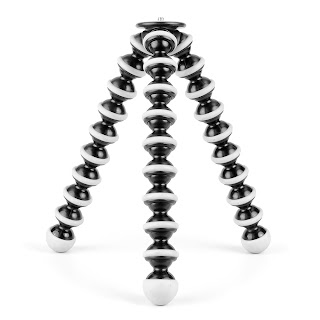
On my recent trip to Florence I knew I’d want to take some low light photos, so a tripod was going to be essential. I also knew I wanted to travel light so I opted for the Gorillapod SLR Zoom.
The Gorillapod has been around for many years now and comes in a variety of sizes. The SLR Zoom is the middle sized offering from Joby. They claim it can hold up to 3kg in weight so I packed a Canon 400D and fitted it with a Canon 24-105mm lens. Weighing in at around 1.5kg it seemed like a good match for the Gorillapod.
The Goillapod is an odd looking thing. Made up of lots of rubbery ball joints it’s about 12” in length and very light in weight. So from a travel point of view it was the ideal choice and was no trouble to carry around. The legs don’t extend so you might class it as a table top tripod, but they do bend.
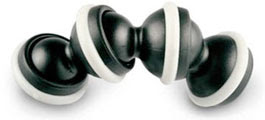 Joby makes a big thing about these bendy legs. The idea is you can wrap the legs around any handy object like a pole, tree or fence and your camera will stay there. The reality is surprisingly close to the marketing hype. It takes a bit of time and practice to get right, but you can indeed attach the Gorillapod to fences.
Sadly there are some weaknesses. The Gorillapod SLR Zoom doesn’t come with a built in ball head so you’re limited to portrait format shooting only. A ball head and quick release plate are available, but that adds extra cost and weight. I also found the Gorillapod to be very bouncy, picking up vibrations and blurring some of the images on long exposure shots or when the lens was zoomed in.
You can watch my video review below.
Conclusion.
The Gorillapod SLR Zoom is a great gadget. Well made, light weight and does what it claims. The bendy legs are an endless source of fun, but care is needed to get the best photos when using it for challenging long exposure images.
Rating:
So did the gorilla pod click my tick? Nearly. It gets a respectable three out of five from me.

OK so everyone agrees that a tripod is a good thing in principle, but like many people I rarely use one. The simple reason for that is tripods are heavy and awkward to carry around especially when you’re travelling.

On my recent trip to Florence I knew I’d want to take some low light photos, so a tripod was going to be essential. I also knew I wanted to travel light so I opted for the Gorillapod SLR Zoom.
The Gorillapod has been around for many years now and comes in a variety of sizes. The SLR Zoom is the middle sized offering from Joby. They claim it can hold up to 3kg in weight so I packed a Canon 400D and fitted it with a Canon 24-105mm lens. Weighing in at around 1.5kg it seemed like a good match for the Gorillapod.
The Goillapod is an odd looking thing. Made up of lots of rubbery ball joints it’s about 12” in length and very light in weight. So from a travel point of view it was the ideal choice and was no trouble to carry around. The legs don’t extend so you might class it as a table top tripod, but they do bend.
 Joby makes a big thing about these bendy legs. The idea is you can wrap the legs around any handy object like a pole, tree or fence and your camera will stay there. The reality is surprisingly close to the marketing hype. It takes a bit of time and practice to get right, but you can indeed attach the Gorillapod to fences.
Sadly there are some weaknesses. The Gorillapod SLR Zoom doesn’t come with a built in ball head so you’re limited to portrait format shooting only. A ball head and quick release plate are available, but that adds extra cost and weight. I also found the Gorillapod to be very bouncy, picking up vibrations and blurring some of the images on long exposure shots or when the lens was zoomed in.
You can watch my video review below.
Conclusion.
The Gorillapod SLR Zoom is a great gadget. Well made, light weight and does what it claims. The bendy legs are an endless source of fun, but care is needed to get the best photos when using it for challenging long exposure images.
Rating:
So did the gorilla pod click my tick? Nearly. It gets a respectable three out of five from me.

Thursday, 11 November 2010
Testing the BlackRapid strap by climbing 463 steps
If you've been watching some of my recent photography tutorials then you might have noticed that I'm not using a standard strap that came with my camera. A lot of people have asked me two questions, is that strap any good and and why switch from the camera makers strap? So I though I’d make a little video to show you.
Lets start with why I’m not using a Canon camera strap. Well because the stap that comes with my camera I find to be very uncomfortable when worn round the neck so I end up putting it over my shoulder. 30 seconds later it slips off. So I take it off my shoulder and it ends up dangling in front of the lens. Then there’s the whole “advertising a camera brand” thing to consider. Do I really want to be a walking advert for Canon or any other camera brand for that matter?
However everything changed earlier this year, when I got my hands on the RS-7 from Black Rapid.
From lots of real world use I already know it's safe and comfortable on a standard days photography, but what if I treated it to a little more energetic use? How good would it feel after a 20 minute climb to the top of the Cathedral in Florence? That's what you'll see in this video.
So how did the RS-7 strap perform? Pretty well is the answer. As I expected it bounced around a bit on the climb, but resting my hand on the camera solved that. Because of the design of the strap both the camera and lens are pointing down so you’re not rubbing the LCD against your clothes.
In term of comfort it was a joy to use. Despite the energetic climb I really didn't have any problems with the strap rubbing or slipping off my shoulder. Bothe the camera and lens reached the top (and back down) with out a scratch.
So would I recommend one? On the whole yes. If you're spending the day walking around then the RS-7 is unbeatable for comfort and security. If you're into action sports where you're running, jumping bouncing etc, then look out for the sports version of this strap (coming soon I understand)
Rating 4.5/5
Lets start with why I’m not using a Canon camera strap. Well because the stap that comes with my camera I find to be very uncomfortable when worn round the neck so I end up putting it over my shoulder. 30 seconds later it slips off. So I take it off my shoulder and it ends up dangling in front of the lens. Then there’s the whole “advertising a camera brand” thing to consider. Do I really want to be a walking advert for Canon or any other camera brand for that matter?
However everything changed earlier this year, when I got my hands on the RS-7 from Black Rapid.
From lots of real world use I already know it's safe and comfortable on a standard days photography, but what if I treated it to a little more energetic use? How good would it feel after a 20 minute climb to the top of the Cathedral in Florence? That's what you'll see in this video.
So how did the RS-7 strap perform? Pretty well is the answer. As I expected it bounced around a bit on the climb, but resting my hand on the camera solved that. Because of the design of the strap both the camera and lens are pointing down so you’re not rubbing the LCD against your clothes.
In term of comfort it was a joy to use. Despite the energetic climb I really didn't have any problems with the strap rubbing or slipping off my shoulder. Bothe the camera and lens reached the top (and back down) with out a scratch.
So would I recommend one? On the whole yes. If you're spending the day walking around then the RS-7 is unbeatable for comfort and security. If you're into action sports where you're running, jumping bouncing etc, then look out for the sports version of this strap (coming soon I understand)
Rating 4.5/5
Wednesday, 3 November 2010
Memories of Florence
Recently I had one of those big number birthdays, the kind of number when life begins or as they say. Faced with the impossible choice of what present to buy Sam (my wife) wisely avoided anything materialistic and instead spent months planning an experience I’d never forget.
 So last week I found myself on a plane with my family jetting off to the historic city of Florence, Italy.
It’s one of those iconic places what just oozes history and where ever you point your camera there’s a photographic opportunity.
Some images like this one are classic “must have” tourist shots and shouldn’t be overlooked simply because this is one of 100 identical images that were taken by me and 99 other people during the 15 minutes I stood in this spot.
 Florence is packed full of art of all types. Sculptures are everywhere, paintings adorn walls and photographers fill the streets. I had a bit of fun counting DLSR brands as we walked around one of the tourist hot spots. For the record Canon & Nikon were seen in equal numbers, but I also spotted a couple of Olympus cameras and one Pentax.
Graffiti was everywhere and whilst it might be argued that it’s a form of art, I disagree when it’s applied to historic buildings and even statues.
 I’m a bit of a low light fan and Florence is one of those cities that looks as good at night as it did in the day. Their electricity bill must be huge! It’s not easy to take great low light shots, but that doesn’t stop everyone trying. It never ceases to make me smile when I see people use the cameras built in flash to photograph a building and then look surprised when it didn’t come out well. At least with digital cameras they only waste batteries.
I recorded several videos during my visit to Florence which I’ll post on the internet. Keep checking the blog or Facebook or Twitter.
 So last week I found myself on a plane with my family jetting off to the historic city of Florence, Italy.
It’s one of those iconic places what just oozes history and where ever you point your camera there’s a photographic opportunity.
Some images like this one are classic “must have” tourist shots and shouldn’t be overlooked simply because this is one of 100 identical images that were taken by me and 99 other people during the 15 minutes I stood in this spot.
 Florence is packed full of art of all types. Sculptures are everywhere, paintings adorn walls and photographers fill the streets. I had a bit of fun counting DLSR brands as we walked around one of the tourist hot spots. For the record Canon & Nikon were seen in equal numbers, but I also spotted a couple of Olympus cameras and one Pentax.
Graffiti was everywhere and whilst it might be argued that it’s a form of art, I disagree when it’s applied to historic buildings and even statues.
 I’m a bit of a low light fan and Florence is one of those cities that looks as good at night as it did in the day. Their electricity bill must be huge! It’s not easy to take great low light shots, but that doesn’t stop everyone trying. It never ceases to make me smile when I see people use the cameras built in flash to photograph a building and then look surprised when it didn’t come out well. At least with digital cameras they only waste batteries.
I recorded several videos during my visit to Florence which I’ll post on the internet. Keep checking the blog or Facebook or Twitter.