Monday, 12 July 2010

The making of a strobist image

Today was a good photography day. I was able to get out of the studio and into the real world, which turned out to be a dark, scary underpass where I photographed a right pair of dodgy looking characters.

Fortunately I know these two guys pretty well and have photographed them several times before. They are iF-e and GManHatton, a couple of Grime artists (a type of Rap music check out their website) from Crawley and despite appearances they’re both amazingly polite and great fun to work with.

They're about to release their second joint album and booked me to do the press / promo shots and the CD cover art. So after arranging to meet them in a Tesco car park we headed to a local underpass which I checked out a few days earlier.

The whole shoot was lit with a single speedlite (Canon 580EXII) as I wanted to perfect my strobist (off camera flash) skills. As soon as I saw the images on the cameras LCD I knew this was going to be a great shoot.

This kind of portrait lives and dies on perfect lighting control and getting it right is a three step process.
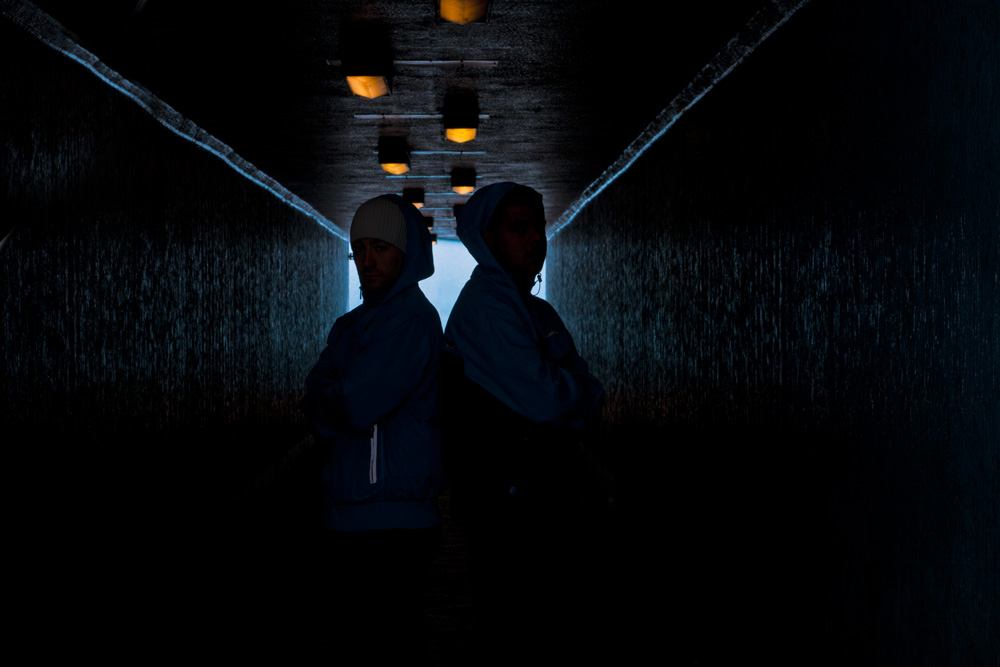
Step one: Unless you want your subjects to be against a jet black background you’ll want to mix the ambient light with flash. To achieve this you’ll need to work out what the ambient exposure actually is. IMPORTANT: The camera’s shutter speed must be lower then its flash sync speed (e.g. 1/250th sec in my case). This shot shows the effect I was after, a splash of light and colour in the background. The exposure was 1/40th sec at f11.


Step two: Now I need to setup the speedlite which I always use in full manual rather then TTL. I started with a flash of ½ power and took a test shot. A quick glace at the camera’s LCD showed the flash was a bit to strong so I dropped the flash to ¼ power. A flash meter could be used to skip this step.


Step three: With the flash set and the exposure locked in we’re rolling. Now I can move around and take different shots without needing to reset the exposure. I can even reposition the flash or change the pose and exposure will remain unchanged, as long as the flash to subject distance doesn’t change.


And here’s the final shop after a bit of Lightroom adjustment.
To give you an idea of how fast and free this technique is, here’s a wide shot. Photography by Sam HoeyFinally here’s a few of my favourite images from the shoot

Saturday, 10 July 2010

One day workshop - Sunday 8th August

What are you doing on Sunday 8th August 2010? If you’re at a loose end and want to improve your photography & Photoshop skills, read on or skip straight to the booking page.

You’ve probably seen one of my 15 minute photo challenges so you’ll already have a pretty good idea of what I’m going to cover in my upcoming workshop. This isn’t going to be a day sitting in front of screen listening to me endless talking about myself and it’s not a day where I set up a shot and everyone gets exactly the same image. No, this is a workshop where you’ll learn by doing as well as watching.

The location

I’ve been very lucky enough to book Highley Manor in West Sussex for the day. We’ll have the entire place all to ourselves and I’ve managed to get permission to shoot images anywhere in the gardens and even inside the house.

There are just 15 places on the workshop, some of which have already gone so it’s first come first served on the rest.

I’m really excited about being able to shoot the interior of the Manor house. It has some amazing beautiful rooms which should yield some pretty unique images. There are also some unusual objects like this suit of armour behind the reception desk.

What to expect
The day is split up into a series of challenges. I’ll show you a camera technique, explain when and why to use it and we’ll all go out and put theory into practice. We’ll then spend some time reviewing the results and applying some of my Photoshop tricks.

By the end of the day you’ll be seeing interesting images all around you and have the skills to get the best images in camera and an understanding of some simple Photoshop techniques for getting the best out of them.

I’m a beginner, should I come?
The workshop is aimed at beginners/intermediate photographers. What does that mean?

To get the most out of the day you’ll need a basic knowledge of how to control your camera’s settings including how to change the ISO, how to shoot in RAW and most importantly, how to put your camera in Aperture Priority Mode. If you can do that then you’re good to go.

What equipment do I need?
A digital SLR camera is all that’s required. This isn’t a gear competition, bring everything you’ve got, but don’t buy anything just for the day. One of the themes for the day is learn your current equipment before buying more.

The only other essential equipment is a tripod. We’ll be shooting inside the manor at some point in the day and for that a tripod is a must.

Where are we going?
Highly manor is 5 minutes from the M23 (junction 10A) and about 15 minutes from Gatwick Airport so it’s very accessible. We have a maximum number of 15 places available on a first come first served basis. Bookings must be made in advance.


Will there be course notes?
Everyone attending the workshop will receive a free limited edition 15 minute photo challenge DVD. It was recorded at Highley Manor and will feature an extended 15 minute challenge with lots of unseen footage plus all the Photoshop tips and tricks I used to achieve the final results.

And before you ask, no you can’t just buy the DVD you’ll need to attend the workshop.


For more details or to book your place follow this link.

Wednesday, 7 July 2010

New online portfolio

Over the past few weeks I’ve been burning the midnight oil redesigning and rebranding the photography side of my business. The first site obvious change is a all new portfolio website which is now online.

As with any new website, it still needs a bit of polishing, but I’d like you to have a look and let me know what you think so far. Either click the image or here’s the link http://www.gavinphoto.co.uk/

So what’s the rebranding? Well after years of photographing kids, families and weddings it’s time for a new challenge. I’ve been fortunate enough to photograph some great unsigned bands and aspiring models over the past few months and that’s an area I’m keen to explore further… Watch this space.

Sunday, 4 July 2010

How to photograph fireworks

My Quick Shots inbox has had a sudden flood of questions overnight regarding photographing fireworks. Here in the UK fireworks only come out at the beginning of November as we celebrate Bonfire Night or for New Years Eve of course.

But fireworks are part of celebrations all over the world and at different times of the year. This Photo was taken in Italy during Ferragosto (Assumption Day)which happens on August 15th.

So why the question today? Well today is 4th July, independence day in the USA. So, here’s my firework photography advice.

1) You’re going to need to get your camera on a tripod as the exposures will be long, far longer then you can do hand held.

2) Switch the camera to manual mode (M on your camera) and enter an aperture of f8 and a shutter speed of 2 seconds.

3) Point your camera to where the fireworks will be and wait.

4) As the fireworks go off take a shot and review the result.
If the sky is too bright use a smaller aperture (f11, f16 etc)
If the firework trails are too small use a longer shutter speed.

Extra tips
A cable release is very hand for this work. It stops you touching and therefore moving the camera which can cause blurred images. If your camera is having trouble focusing switch for manual focus and set it to infinity. Finally, don't use flash.

Friday, 25 June 2010

Guest blog post at Tip Squirrel.com

I'm very pleased to be todays guest blog poster over at Tip Squirrel.com


I wasn't asked to write about anything in particular so my post is about Lightroom vs Photoshop. There's also an exclusive Lightroom video that goes with the blog post. If you want to see it click the photo.


If you've got a few minutes to spare pop over to Tip Squirrel and have a read of some of the excellent Photoshop & Lightroom tips from some very well known authors.

Wednesday, 23 June 2010

Grey background lighting tips and tricks - Quick Shots 08

This Quick Shot question is from Nick Stewart who wanted to know what all the fuss is about grey backgrounds and some tips on lighting them.

First off I should say my studio is fitted with a seamless vinyl background which I absolutely love working with. With careful lighting I can make it pure white through to dark grey. I also have a roll of black muslin which I roll out if I need a black or light it with gels for some funky colour effects.

Much as I love my white seamless, if I only had the room/money for one background it would be grey. Why? Well watch the video to find out.


A couple of questions from the video.

What triggers were you using?
They’re the Yongno RF602

I love the gel idea who makes them?
I’m using the Strobist gels from Rosco Here's the link

Great, how do I attach them to the speedlite?
I use two little bits of blu-Tack at the edge of the flash. The gels stick every time.

Where have I seen that softbox before?
It's a Lastolite Ezybox and you might have seen it here

Where did you get the grey background?
You can pick them up from many places but mine came from my good friends at smick.co.uk. Here’s the link

Why didn’t you iron the background?
Good point. The reason was to show that creases can vanish when lighting the grey background to white.

So are you saying DON’T iron a muslin background.
No, always iron it before using it.

Monday, 21 June 2010

Last chance to win...

There’s just over a week to go on for your chance to win one of three limited edition signed prints from the Photo Beach Teach DVD.
To be in with a chance of winning you simply need to buy a copy of the Beach Teach DVD before the end of June 2010. Good luck.

Many of you know that I’ve been a freelance contributor to Digital Photo Magazine (The UK’s best selling photographic magazine) for a good number of years, but if you haven’t seen a copy here’s a sneak peek. Have a look for part of my article on capturing an action sequence.
The July issue of Digital Photo Magazine is out now.

.